Showing posts with label Facts and Fiction. Show all posts

Friday, August 3, 2012

Ad blocking part II: Blocking unwanted ads


Happy Friday and welcome to the second installment of the ad blocking series! In our first blog post, we talked about different reasons for blocking ads and common myths about ad blocking. Today we’ll discuss how to block ads you don’t want to allow on your site. Once you’ve identified the ads you don’t want to show, there are a few ways to block them: by advertiser URL, general or sensitive category (limited language availability), ad network, and individual ad creative. Below, we’ll bust more myths commonly believed about blocking unwanted ads.

Myth: The ‘Allow and block ads’ tab of my account is the only place I can block ads.
In addition to blocking ads via the AdSense interface, you can install the Google Publisher Toolbar to block ads while viewing your pages in a Chrome browser. The Publisher Toolbar is a Chrome extension that lets you view up-to-date information about your AdSense account, offers an overview of your earnings and performance, and provides ad overlays with in-page reporting. For more details on this new Chrome extension, visit the Inside AdSense blog post.

Myth: Because the ad is an image or rich media, there’s no way to find the destination URL without clicking the ad and violating AdSense policy.
As a publisher, you have a few options when trying to find out which URL you want to block:

  • If you’re using Chrome, install the Publisher Toolbar extension mentioned above, which allows you to block ads as you’re seeing them on your site. 
  • In your AdSense account, you can opt into the Ad Review Center where you can see all of the ads shown on your site, including text, image, and rich media ads. 

Myth: I don’t see any ads in the Shown Ads tab of the Ad Review Center, but I see ads on my site. The Ad Review Center doesn’t work! 
The Ad Review Center is a tool that allows you to review individual ads and choose whether or not to let them be displayed on your pages. Ads in the Ad Review Center have shown within the last 30 days. If your site has not shown any ads within the last 30 days, no ads will show in the Ad Review Center. Also, if you have very low traffic on your site, you may not see ads in the Ad Review Center. After you’ve submitted the request to opt in to the Ad Review Center, please allow 24 to 48 hours for ads to begin showing under the Shown Ads tab. Read more information about the new and improved Ad Review Center in our previous Inside AdSense blog post.

We hope that this blog post has busted some of the myths associated with the ad blocking feature. Have more questions? You can submit them by commenting on the post on the Google AdSense +page. We’ll be answering those questions in a Google+ Hangout on Air on Tuesday, August 7th at 10am PDT. We hope you can join us!

Posted by: Wesley Houser, Inside AdSense Team

Wednesday, August 1, 2012

Ad blocking part I: To block or not to block?

Think of your website as your kingdom. You’re in control of what will be shown. AdSense provides strong controls that enable you to allow and block ads on your website. Ad blocking shouldn’t be thought of as a means of account optimization, but as a way to make sure you’re satisfied with the ads that are shown. Over the next few days, we’ll be busting some of the most common myths associated with ad blocking that we’ve heard from publishers.

Myth: It doesn’t matter how many ads I block, they’ll just be removed from my site.

Ad blocking should be used sparingly. Displaying all ads creates the most competitive atmosphere in the ad auction, with the largest amount of ad inventory possible competing for an impression on your site.

That said, there are some good reasons for blocking ads:
  • You’re sensitive to the content of a particular ad (or category of ad) and would prefer it not to show on your site (e.g., politics, sexuality, or religion).
  • You want to block ads from a particular company because you already have a direct advertising deal from them.
  • You want to block ads from a competitor of your business.
Myth: If I block low paying ads I'll make more money.
Even if a particular ad is only contributing a small portion to your revenue, blocking it will likely cause a lower revenue-generating ad to show. We'll always display the highest-paying ad, so if an ad appeared on your site, it meant that it was the highest-performing ad of all available.

Myth: I blocked some ads for a few days and my earnings went up. This means blocking helped my earnings grow!
Earnings in your AdSense account can constantly fluctuate. Your revenue depends on a number of variables from traffic changes on your site to advertisers changing their bids. Be careful when assuming that correlation indicates causation!

As mentioned in this Help Center article, we target ads based on your content and audience. The ads that you see aren’t necessarily the same ones your users see (e.g., interest-based advertising and geotargeting). Also, ads that may seem off-topic to you as a publisher might actually be the most valuable to the user in that browsing session.

Myth: If I block enough ads, I can essentially pick the ads that will show on my site.
As Hal Varian, the Chief Economist at Google, stated in a previous post, the ads that win in the auction are the ones that are expected to deliver you the most revenue, while ensuring a good user experience. The same ads don’t always appear on your site for a variety of reasons, ranging from changes in advertiser spend to geotargeting of users.

Now that we’ve addressed some common myths, we invite you to join us for a Google+ Hangout On Air focused on ad blocking. It’ll take place on Tuesday, August 7th at 10am PDT, and you’ll have the opportunity to learn more about ad blocking and hear answers to your related questions. To submit a question about ad blocking, simply leave a comment on the post on our AdSense +page. We also encourage you to +1 questions posted by other publishers that you’re interested in hearing the answers to.

Stay tuned for part II of our ad blocking series on Friday!

Posted by: Wesley Houser, Inside AdSense Team

Tuesday, May 29, 2012

New industry metrics to help publishers make the most from the web

Over 2 million AdSense publishers like you create the unique and diverse content that we all love - whether it’s finding reviews for a new restaurant, or do-it-yourself furniture makeovers. Online advertising helps fuel this creativity, and we’ve been improving our products to help you make the most of every opportunity - from making it easier to earn revenue from the mobile web, or welcoming Indonesian publishers to the AdSense community.  One of the ways we can continue to support you is by giving access to new sources of industry knowledge to enable you to make the most from display advertising. With this is mind, today we’re introducing a new report, “Display Business Trends: Publisher Edition”.

What’s inside for AdSense publishers? Well for starters, there are answers to questions like:
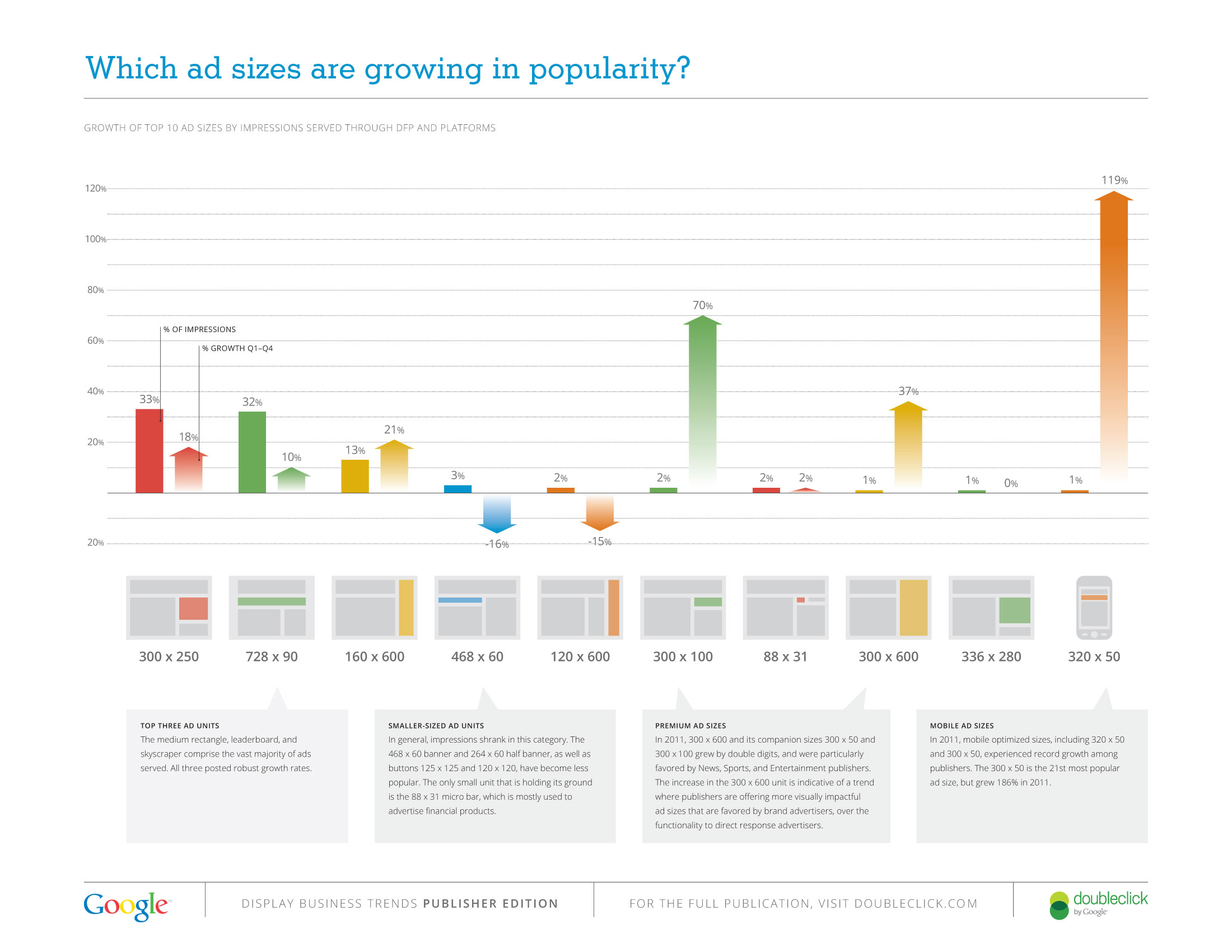
  • Which ad sizes are rising in popularity? You control the ad experience on your site by choosing ad sizes that fit the design of your pages. But with such a flexible selection, which ad sizes should you pick? We found that 80% of all ads served tend to be the three best performing ad units for AdSense publishers: the medium rectangle, leaderboard, and skyscraper. We’re also seeing fewer publishers use smaller ad units, like the 468x60 banner.
  • Is the mobile web really a big deal? We think so! We saw a 250% increase in mobile web impressions over the last three months of 2011. Growth in mobile usage has exploded, and there’s never been a better time for your site to go mobile. Check out resources for publishers on our GoMo site and Mobile Mondays blogposts.
  • Which sites are showing strong impression growth? In 2011, we found that Shopping, Sports, and Auto & Vehicle sites were some of the fastest year-on-year growth verticals on the Ad Exchange and AdSense. We saw impressive figures across the board, with 15 out of 25 publisher verticals displaying double-digit growth.
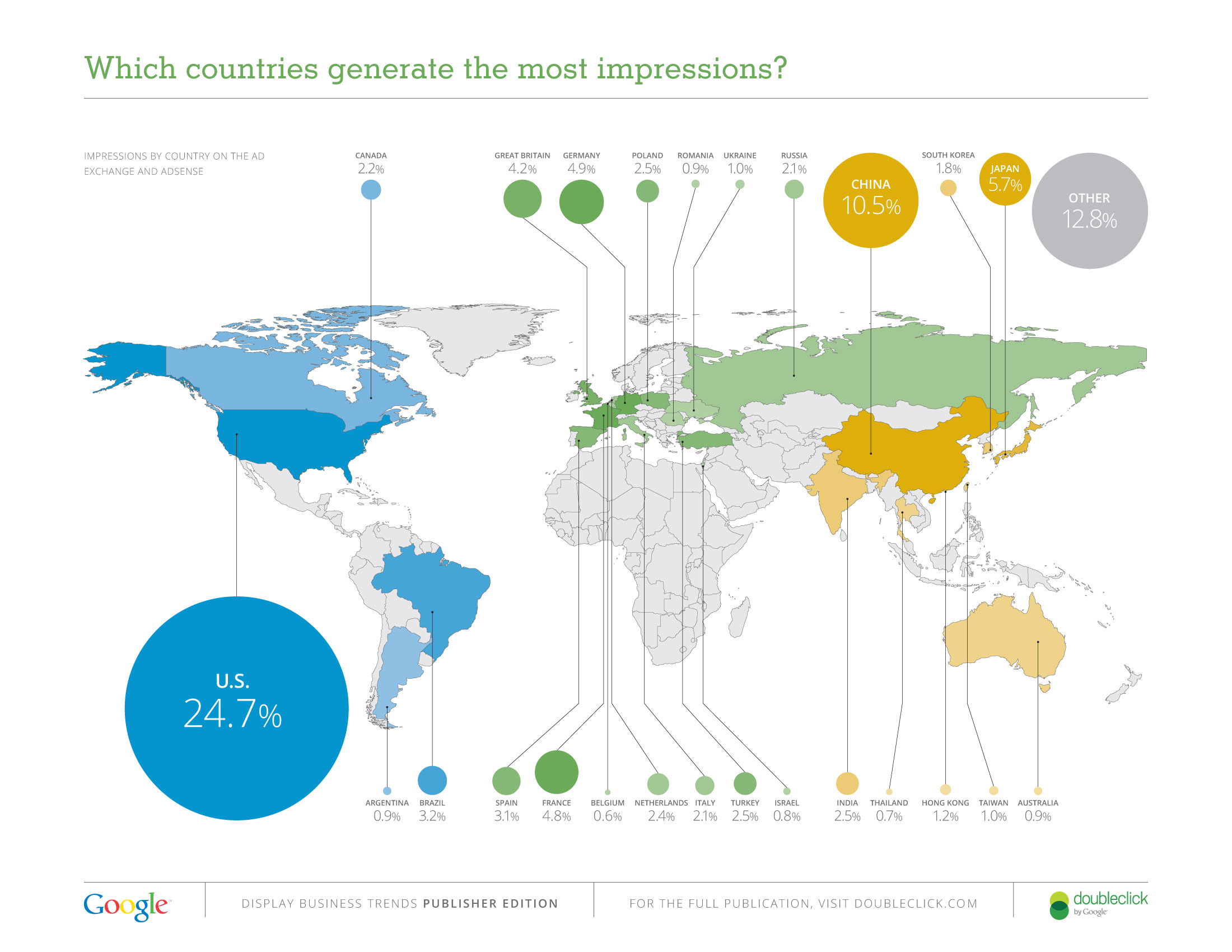
  • Where in the world are you? All over, as it turns out. Of a possible estimated 245 different countries and territories, we saw publisher ad impressions from 235 of them. These included the island country of Palau - one of the world’s newest sovereign states - and the middle-African nation of Equatorial Guinea, with astounding growth rates of 1106% and 4635% respectively. And while the United States still accounts for the highest percentage of impressions overall, we’re seeing a significant representation from China and Japan, coming in at 11% and 6% respectively.


The Publisher Edition will be the first in a series of publications looking at aggregated global data from across Google’s display advertising solutions, so stay tuned for more industry metrics to come. In the meantime, join the conversation and tell us what you think is behind these trends on our AdSense +Page.

Posted by Mel Ann Chan, Product Marketing Manager, Display Advertising

Monday, January 31, 2011

AdSense Facts & Fictions Part VI: User-Generated Content

Fiction: I shouldn’t be held responsible if users post content on my site or network that violates AdSense policies.

Fact: You are responsible for ensuring that all of your content, including user-generated content such as forum posts, blog comments or outside feeds, is in compliance with AdSense policies on any page or site for which you’ve enabled AdSense ads.

As we’ve discussed in previous posts in this series, we regularly review the content in the AdSense network to ensure that it's safe for advertisers, users, and publishers, as network quality is of premium importance. Just as you, our publishers, expect us to do all we can to remove undesirable ads, our advertisers expect high standards to be maintained; for example, a company using AdWords to market baby clothes doesn’t want their ads to appear next to violent or mature content. In order to be transparent about what kinds of content violate our policies, we’ve published a complete list in our Help Center.

Making sure content complies with our policies can be complex when factoring in user-generated content. Keeping tabs on the hundreds (or even thousands!) of videos, blog posts, photos, tweets, and comments that can come in every day is a massive undertaking. However, you are ultimately responsible for all sites on which you have placed your ad code, regardless of whether you own or have produced the content. This blog post provides a few suggestions to help you prevent and monitor potential content violations.

In most cases, our first step after a policy violation is found is to issue a policy notification for the site. Exceptions include DMCA and egregious policy violations, more details here. After the initial notification, you need to take action, not simply respond to the warning, but implement solutions to proactively ensure that violating content is removed and new content added to the network or site complies with our policies.

We understand that it can take time to find the best solution to prevent problematic content from appearing on your site and we want to work with you to give you the time needed to find a fix. If it becomes evident that a publisher is unable to do so, or if the violation is continuing or egregious, then we will disable an account. We offer an appeals process, but the bottom line is, we can’t partner with publishers that pose a risk to our advertisers (just as we won’t partner with advertisers that could compromise you).

We know how hard you work to make sure that your sites are of the highest quality and free of adult content, unoriginal content, or anything else that may violate policies and we thank you for your efforts. When advertisers, publishers, and users know they can trust the integrity of our advertising environment, everyone wins.

Tuesday, January 11, 2011

AdSense Facts & Fiction Part V: Unoriginal content

Fiction: Publishers can put ads on auto-generated pages or other copied content that was not created by them.

Fact: We don’t allow sites with auto-generated or otherwise unoriginal content to participate in the AdSense program. This is to ensure that our users are benefiting from a unique online experience and that our advertisers are partnering with useful and relevant sites.

In the past, we’ve talked about tips for maintaining an AdSense-friendly site with user-generated content (UGC). Today's topic is not only applicable to UGC sites, but also to all websites affiliated with AdSense for content.

Sometimes we come across sites that are using software to generate automated content. These sites might look like normal news sites, but the information is completely plagiarized. Scraping content and passing it off as one’s own is not only wrong, but it also happens to be a serious violation of our policies. AdSense depends on maintaining a balance between user, publisher, and advertiser experience. We strive to protect that ecosystem as much as possible by encouraging and protecting unique and relevant content.

Obviously publishers and Google are concerned with revenue generation, and when original traffic encounters quality content, it’s a match made in heaven. The best way to engage users in the long term is to engage users. Provide your opinion on the news, offer a different service, organize your site in a way so that a user is captivated and moved.

Take some time to familiarize yourself with these webmaster quality guidelines, and if you find sites within our network that are clearly violating these guidelines, feel free to report it to us.

One last thing: a quick, but well-deserved thank you to the majority of you that continue to inspire us with your great, unique, and creative content. Keep up the awesome work!